This article provides you general information to upgrade an on-premise deployment of iObeya.
We recommend upgrading your iObeya platform at least once a year to stay no more than one version behind the latest release.
The iObeya support policy only supports the most recent minor version of iObeya on-premise servers.
Information:
A maintenance page is available for your upgrade process. We can provide you with the necessary resources to set it up but the actual configuration is up to you.
Simply reach out to us to request the resources needed.
Upgrade Path
To successfully upgrade from an old version of iObeya, you need to follow the upgrade path and upgrade to every version between the one you currently have and the targeted one.
If you fall behind and your instance is on an unsupported version, please contact your dedicated Customer Success Manager or our Support team to get guidance regarding the upgrade path to follow.
If you need to go through several versions to upgrade your on-premise servers:
Follow the upgrade path and use the upgrade guide for the targeted version.
For each version of iObeya on-premise servers, follow the upgrade guide for the corresponding version and restart the iObeya service once before you proceed to the next version.
Before you start your upgrade, you need to request access to download the latest version of iObeya.
From iObeya 4.31, you have to upgrade to iObeya 4.36.
From iObeya 4.36, you have to upgrade to iObeya 4.40.
From iObeya 4.40, you have to upgrade to iObeya 4.43.
From iObeya 4.43, you have to upgrade to iObeya 4.46.
From iObeya 4.46, you have to upgrade to iObeya 4.47.
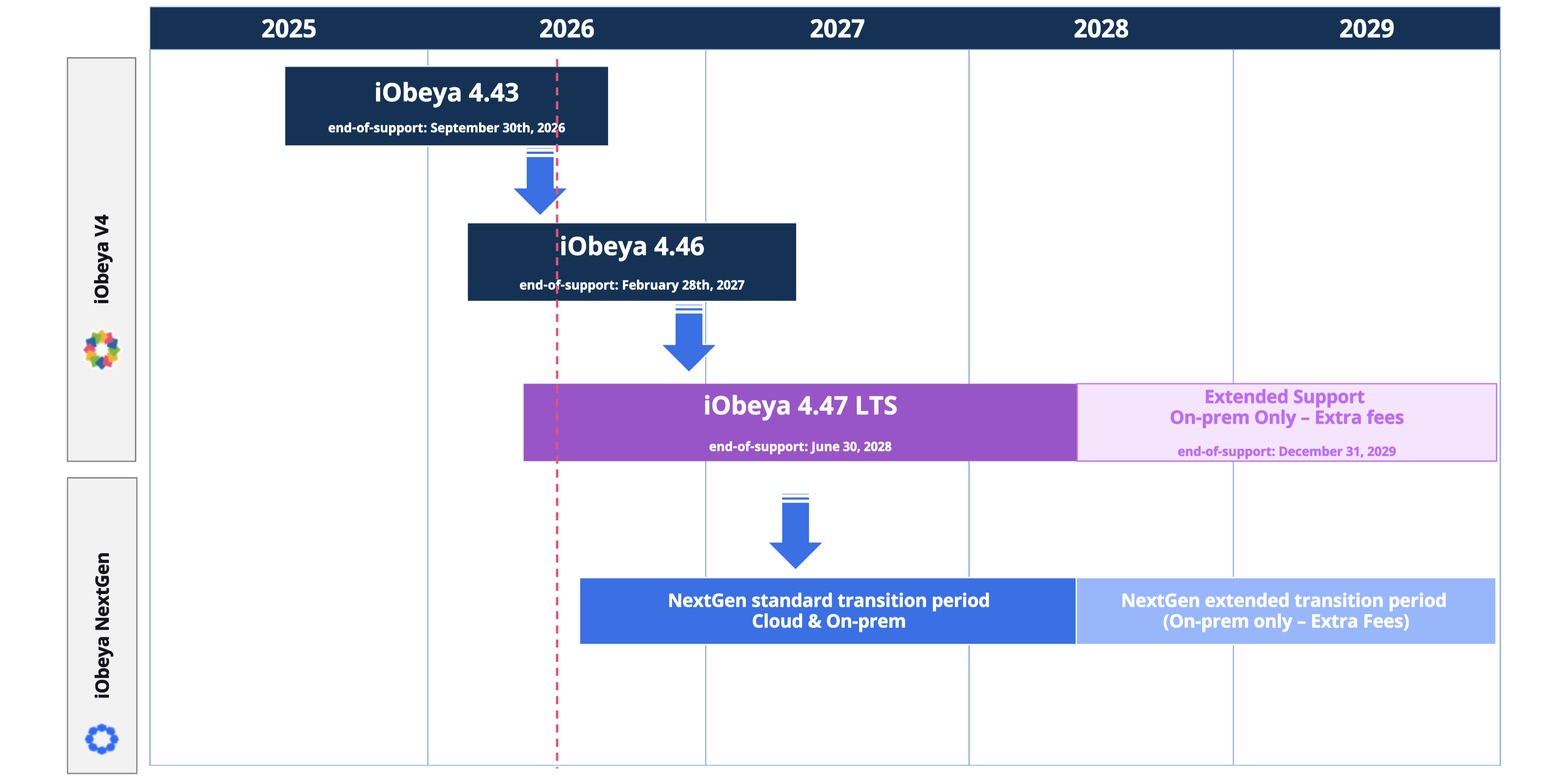
iObeya 4.47 is the final major release of iObeya V4 On-premises and the reference Long-Term Support (LTS) version before migration to NextGen On-prem.
Under the LTS program, version 4.47 benefits from 24 months of standard support. During this period, it continues to receive security updates, bug fixes and maintenance releases. No additional major feature releases are planned.
.png)
Standard support for iObeya V4 On-premises ends on 30th of June 2028. If you want to continue receiving support after this date, you can pay for the extended support service until 31st of December 2029. Please contact your dedicated Customer Success Manager or our Support team early to discuss your requirements.
All customers must complete their migration to NextGen On-premises by 31st of December 2029. Support for iObeya V4 On-premises ends permanently after this date.
Preparing your transition to NextGen On-premises:
iObeya 4.47 is the required version for migration to NextGen On-premises.
For reference:
iObeya 4.43 is supported until 30th of September 2026.
iObeya 4.46 is supported until 28th of February 2027.
If you are running a version earlier than iObeya 4.47, plan your upgrade to version 4.47 as soon as possible. Upgrading early gives you more time to prepare for the NextGen On-premises transition.
If you have any questions about the transition to NextGen On-premises, we encourage you to start the discussion early rather than wait until the end of support for your current version.
Please contact your dedicated Customer Success Manager or our Support team to discuss your requirements, transition plans. We can help you anticipate the next steps and prepare for a smooth transition to NextGen On-premises.
Preparation is the key to success:
An upgrade is a good opportunity to assess whether the current environment meets your needs or if it makes sense to make changes.
Upgrading to a new version may require new hardware or software to meet the technical requirements.
Prepare adequately and identify any necessary changes to ensure that your upgraded system works optimally and meets your needs in the long run.
Expect the best, prepare and plan for the worst:
Even though the upgrade procedure is reliable and each new version of iObeya has been tested and validated during months with our Cloud customers, it always makes sense to prepare for any unforeseen issues when you upgrade your on-premise instance.
As a precaution, it is important to understand how to:
revert to the previous version.
check if you have a complete and consistent backup of your iObeya database and assets files available.
This ensures that you can easily restore your system to its previous state in the event of any unexpected problems during the upgrade process. Use the Backup and restore section to create a backup of your iObeya database and assets files.
Warning:
Do not forget to check the iObeya license deployed on your server before you upgrade to a newer version of iObeya.
Attempting to upgrade to a version that has been released after the support date of your license will lead to the inability to restart iObeya. Information regarding the support date of the current license is available on the License page in the administration interface of the platform, as well as the release date on Resource Center.